 ProxWatch
Know what's wrong with your Proxmox at a glance.
ProxWatch sits in your Mac's menu bar and watches your Proxmox VE servers. It stays quiet while everything's healthy, and tells you the moment something actually needs you: sustained load, a failing disk, a degraded pool, a backup that didn't run.
For Mac · Requires macOS 15 and Proxmox VE 7 or later
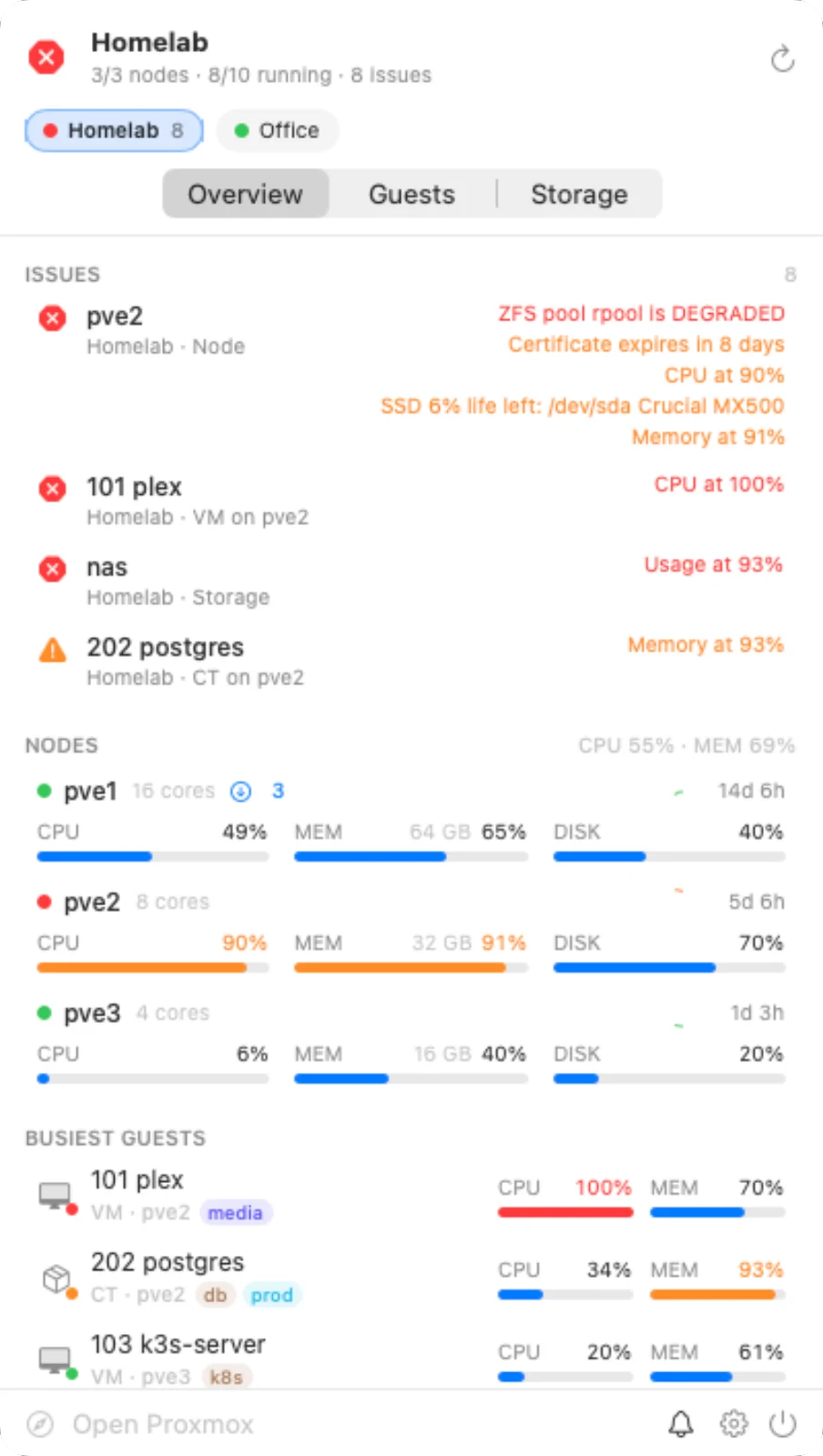
Quiet when you're busy. Loud when it matters.
Most monitors tell you whenever something changes. ProxWatch checks Proxmox's own task log first, so the backup that stops a VM at 2am, the container you shut down yourself and the migration you started don't wake you up. The failing pool does.
Notify on every change7 alerts
plex stoppedThe nightly backup, in stop modeplex startedThe backup finishedgrafana stoppedYou shut it down in the web UIk3s-server stoppedMigrating to pve3k3s-server startedThe migration finishedscratch stoppedYou stopped it from the menu barscratch startedYou started it again
ProxWatch3 alerts
- Backup stopped and restarted plex. Nothing to report.
- ZFS pool rpool on pve2 is DEGRADEDA disk dropped out of the mirror
- A shutdown and a migration, both in the task log. Nothing to report.
- postgres memory at 93%Over 85% for three checks in a row, not a blip
- Backup job failed on pve1Right-click it to open the task in Proxmox
The problems worth knowing about, with sensible defaults.
Every threshold can be changed in Settings. Mute one issue until it's fixed, stop alerts for a resource completely, or snooze everything for an hour.
| Check | Alerts when | Default |
|---|---|---|
| CPU and memory | Load stays over the threshold for several checks. Short spikes are ignored, and alerts don't flap near the line. | 85% · 95% · 3 checks |
| Disk and storage space | A node's root disk, a container's disk or a datastore fills up | 80% · 90% |
| Nodes and clusters | A node goes offline, the cluster loses quorum, or HA reports an error | Always |
| Disks and ZFS | A disk fails its SMART check, or a ZFS pool isn't ONLINE | Always |
| SSD wear | An SSD is close to the end of its rated life | 10% left |
| Certificates | A node's web certificate is about to expire | 14 days · 3 days |
| Unexpected stops | A guest stops and no shutdown, migration or backup explains it | On |
| Failed tasks | A task such as a backup job fails | On |
| Backup coverage | A guest isn't included in any backup job | Off |
| Connection | A server can't be reached, and again when it's back | On |
Your whole Proxmox setup, one click away.
ProxWatch talks to the Proxmox VE API directly, so it sees what the web interface sees, without a browser tab left open.
A menu bar icon that means something
Monochrome while all is well, orange or red when it isn't. Or show the issue count, running guests, or cluster CPU and memory.
Every server and cluster
Add as many as you like. Each gets a chip coloured by its health, and issues from all of them are listed together, worst first.
History charts
CPU, memory, network and disk I/O for any node or guest, over the last hour, day, week or month.
Power controls
Start, shut down, reboot or pause a VM or container from the menu bar. Force stop and reset ask twice.
Search, sort and filter
Find a guest by name, ID, tag or node. Show only running, stopped or troubled guests, sorted by load.
Node health
Pending package updates, certificate expiry, SMART results and SSD life for every disk, and which guests have no backup job.
Notifications with buttons
Open the resource in Proxmox, mute the issue until it's resolved, or snooze everything for an hour, right from the notification.
Alerts on your phone
Forward alerts to ntfy, or to any JSON webhook such as Home Assistant or n8n.
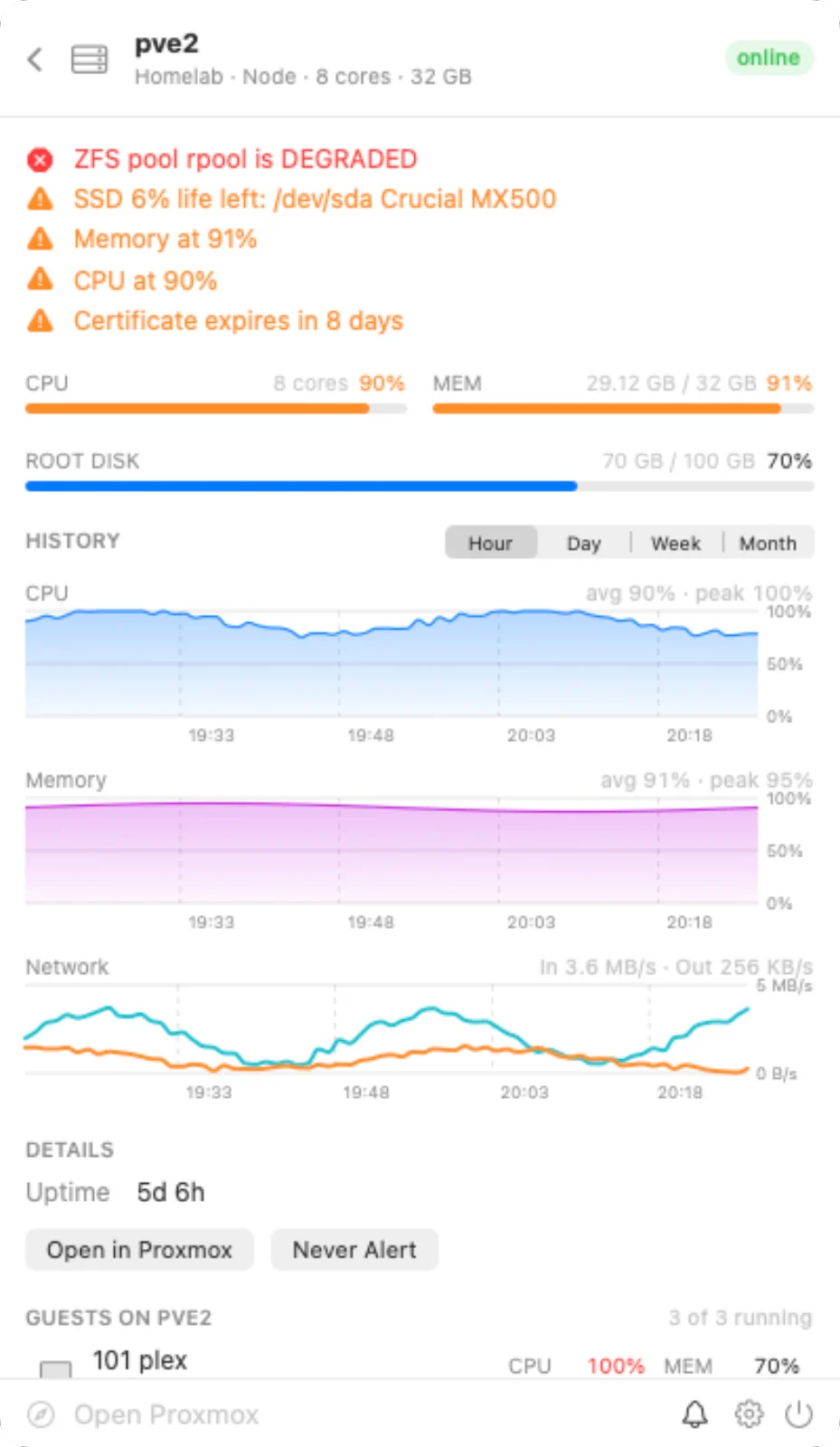
See how it got there.
Click any node or guest for its live numbers and charts. Spot the slow climb in memory before it turns into an alert.
- Last hour, day, week or month, straight from Proxmox's own records
- Averages and peaks for each chart
- Its issues listed at the top, with a link to open it in Proxmox
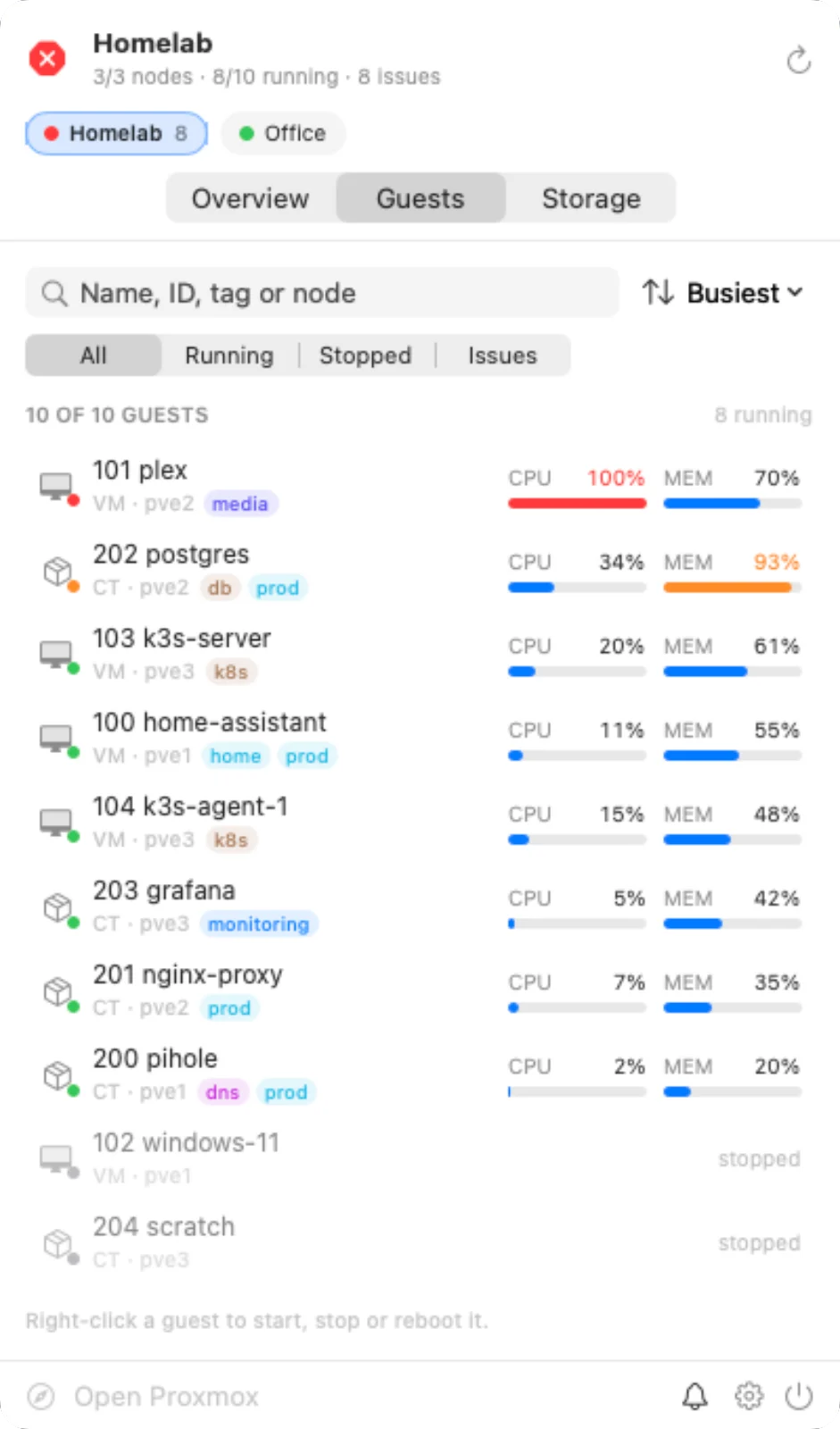
Find any VM or container, and do something about it.
Every guest across every node, busiest first. Right-click one to start, shut down or reboot it without opening a browser.
- Search by name, ID, tag or node
- Filter to running, stopped, or only the ones with issues
- Proxmox tags shown on every guest
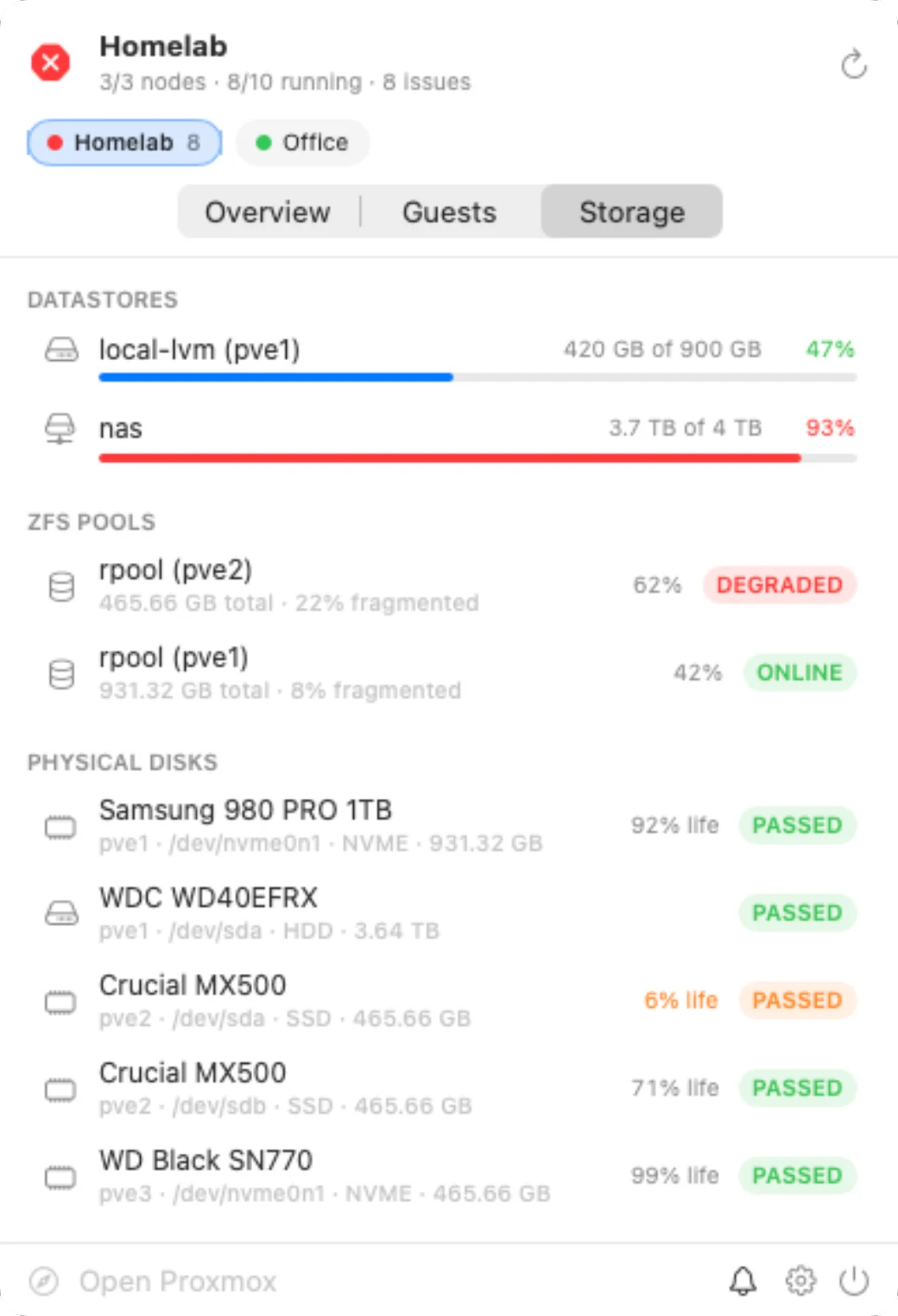
Catch failing hardware before it takes a node down.
Datastore space, the state of each ZFS pool, and every physical disk with its SMART result and how much life an SSD has left.
- Degraded pools and failed SMART checks alert straight away
- Worn SSDs flagged while there's time to replace them
- Shared storage counted once, not once per node
Your servers, on your desktop.
Widgets show the issues themselves, not just a count. Watch a whole server, every server, or a single VM or container, and click one to jump straight to it.
- A Server Status widget in small, medium or large, for the server you pick
- An All Servers widget, worst first
- A VM or Container widget for the one guest you care about most, with its recent CPU and memory
- Ring-gauge versions of the server and guest widgets, if you prefer dials to bars
- Marked as stale if your Mac hasn't been able to check in a while
Your Mac talks to your servers. That's it.
No accounts, no cloud service in the middle, no analytics. ProxWatch connects straight from your Mac to the servers you add.
Questions you might have.
What do I need?
A Mac with macOS 15 or later, and a Proxmox VE 7 or later server or cluster that your Mac can reach. ProxWatch connects with a Proxmox API token, which takes a minute to create. The support page has the commands.
Does it need to change anything on my servers?
No. Nothing is installed on your servers, and a read-only token with the PVEAuditor role is enough for monitoring and every health check. If you want to start and stop guests from the menu bar too, give the token the VM.PowerMgmt privilege as well.
How do I connect to a server with a self-signed certificate?
Click Fetch when adding the server. ProxWatch reads the certificate's fingerprint, you check it matches the one shown in Proxmox, and from then on only that certificate is accepted. More on certificates.
Can I get alerts on my phone?
Yes. Turn on forwarding and ProxWatch sends each alert to an ntfy topic, which pushes it to the ntfy app on your phone, or to any webhook, such as Home Assistant or n8n. ProxWatch does the checking, so your Mac needs to be awake with ProxWatch running.
Will it alert me when I shut a VM down myself?
No. Before reporting a stopped guest, ProxWatch looks in Proxmox's task log for a shutdown, stop, migration or backup that explains it, wherever it was started from. Stops you start from ProxWatch itself are never reported either.
Does it work with clusters?
Yes. Add any node in the cluster and ProxWatch sees every node, guest and datastore in it, along with quorum and HA status. You can add standalone servers and clusters side by side.
Can I try it without a server?
Yes. Click Try It with Demo Data in the menu bar panel to explore two sample clusters with live-updating numbers and a few problems to look at. Nothing in the demo touches a real server.
Does it support Proxmox Backup Server or Proxmox Mail Gateway?
No, ProxWatch works with Proxmox VE. It does report failed backup jobs that Proxmox VE runs, including ones that back up to a Proxmox Backup Server.
Is this made by Proxmox?
No. ProxWatch is an independent app that uses the public Proxmox VE API. It isn't affiliated with or endorsed by Proxmox Server Solutions GmbH.
 ProxWatch
Coming soon to the Mac App Store.
ProxWatch is in testing right now, and will be on the Mac App Store soon.